
Frictionless P6 Schedule
Viewing and Collaboration
An accessible, standalone schedule collaboration tool for individuals and teams to view XERs and discuss changes in context. No P6 license required.
 Pretask.AI
Turn your P6 XER file into a shared working view, right from your browser.
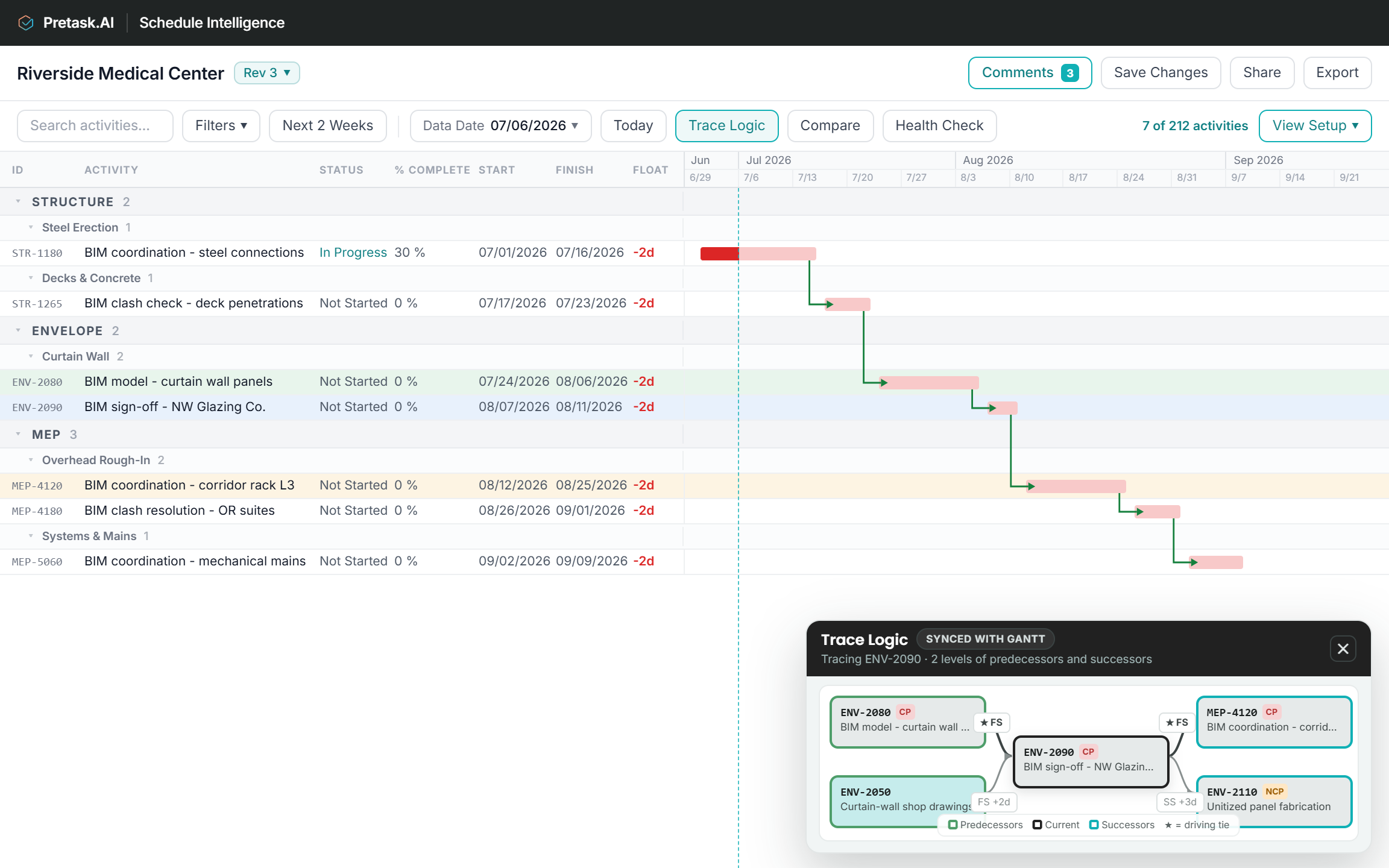
Search and filter activities, expand the WBS, inspect dates and float, and trace the logic driving any activity. Save your views for easy access.
Compare up to four schedule revisions in one Gantt. Spot date shifts, added or removed activities, and relationship changes without flipping between files.
Invite project partners to the same revision. Comment on an activity or WBS row, reply in thread, and keep the conversation attached to the work.
Run automated schedule health checks, understand what was flagged within the context of the activities.
Update activity status, percent complete, and actual dates. Save or create a new revision, and export an updated XER or PDF.
Pretask.AIPretask.AIPretask.AIPretask.AIPretask.AIGet answers faster
Pretask.AICompare revisions to understand what changed
Compare up to four revisions in the same screen. Immediately see changes in dates, progress, activities, and logic.
Pretask.AIShow all changes to see every difference instantly. Click a flagged activity to see its dates, progress, and logic against the primary revision.
New scope in, deleted scope out. Both surface in the comparison.
Collaborate in one shared workspace
Pretask.AIReview and discuss the P6 schedule, without needing Oracle Primavera P6 licenses.
Invite project partners to the exact schedule revision under review so each person starts from the same information.
Keep every thread attached to the activity or WBS row it concerns rather than losing the discussion across email, PDFs, and meeting notes.
One click to know if the project finishes on time
Get instant validation scoring, risk identification, and critical path analysis with underlying reasons. Jump directly to the affected activities for additional context.
Is this schedule mechanically credible?
How serious are the problems and what is dragging the score down?
Which specific activities warrant review first?
Know what to chase before the finish date slips. Schedule Intelligence ranks the activities deciding it and shows why each made the list. Jump straight to them in the Gantt, or take the list to your next meeting.
Pretask.AITurn project inputs into usable schedule updates
Record status, percent complete, actual dates, and activity level context in a working revision. Save it, share it, and export an updated XER or meeting-ready PDF.
Pretask.AIUpdate status, percent complete, and actual dates against the relevant activities.
Save updates to the existing file, or save as a new revision so the original stays untouched.
Return an updated XER to P6 or create a clear PDF for the next meeting.

Top tier operators from construction, tech, and AI. $201234567891011121314151617181920B+ in impact to the construction environment.


A decade in SaaS, most recently at Revizto helping some of the largest AEC firms in the US improve project delivery.

Ex-Director of Machine Learning at Walmart building their prediction technology. 20+ patents, now leading Pretask.AI's technical direction on predictive intelligence for AEC.

Ex-Swinerton National VP (retired). Chris is now supplementing our domain expertise with his extensive construction executive experience.
Building predictive intelligence for the AEC industry
Let's help you work and collaborate better. Priced accessibly for everyone.
Still thinking about it? Try it for free.
Try it on a live project.
Free 30-day trial · up to 5 users · unlimited schedule revisions
Sure! Email us at sales@pretask.ai and we’ll get back to you right away.
The export format Primavera P6 uses for schedules. If someone sent you “the schedule” as a file, it is probably an XER. Pretask opens it in your browser. No software to install.
No. Schedule Intelligence acts as the accessible view and collaboration tool for the broader project team where P6 is either too expensive or too complex to be practical for everyone on the project. You simply upload the P6 file (XER) and the full schedule opens in your browser. No P6 license, and no dedicated software to install.
Not for the scheduler responsible for building and maintaining the master schedule. P6 remains the system of record for schedule logic, calendars, sequencing, and formal schedule updates.
For the rest of the project team, Schedule Intelligence can replace the need to work directly in P6. Schedule Intelligence lets you review the schedule, trace logic, comment on activities, run health checks, and update status, percent complete, and actual start/finish dates without needing your own P6 license. Schedule Intelligence can then export an updated XER for the scheduler to review and continue maintaining in P6.
We currently support Primavera P6 XER files. If you’d like us to consider other formats, drop us a line at sales@pretask.ai.
Yes. Edit status, percent complete, and actual start/finish dates. Save your work as a revision and export an updated XER or a multi-page PDF.
Only people you invite. Everyone logs in with their own account, and you control who is on each project.
Pretask runs on Microsoft Azure, the same secure cloud platform that runs much of the world’s enterprise software. Your data is not shared outside of the Pretask environment. You log in with your existing Microsoft or Google account so there are no extra usernames or passwords to remember. The only information we receive from Microsoft or Google is your name and email address in order to facilitate log in.
Request the free trial and our team will email login instructions. From there, upload your XER and the schedule opens right away.
California, USA.
Frictionless P6 Schedule Viewing and Collaboration
An accessible, standalone schedule collaboration tool for individuals and teams to view XERs and discuss changes in context. No P6 license required.
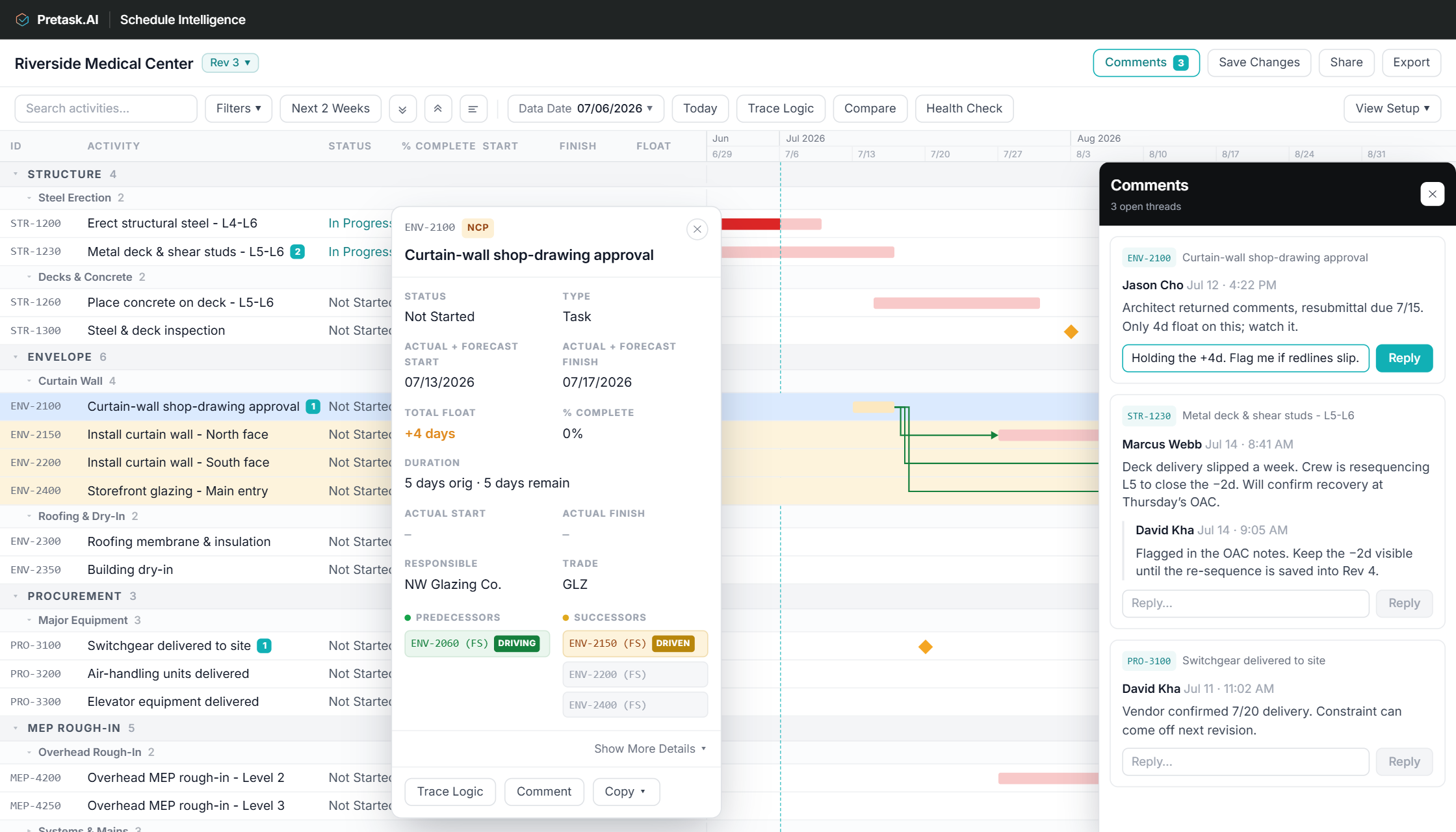
Turn your P6 XER file into a shared working view, right from your browser.
Search and filter activities, expand the WBS, inspect dates and float, and trace the logic driving any activity. Save your views for easy access.
Get answers faster
Compare revisions to understand what changed
Compare up to four revisions in the same screen. Immediately see changes in dates, progress, activities, and logic.
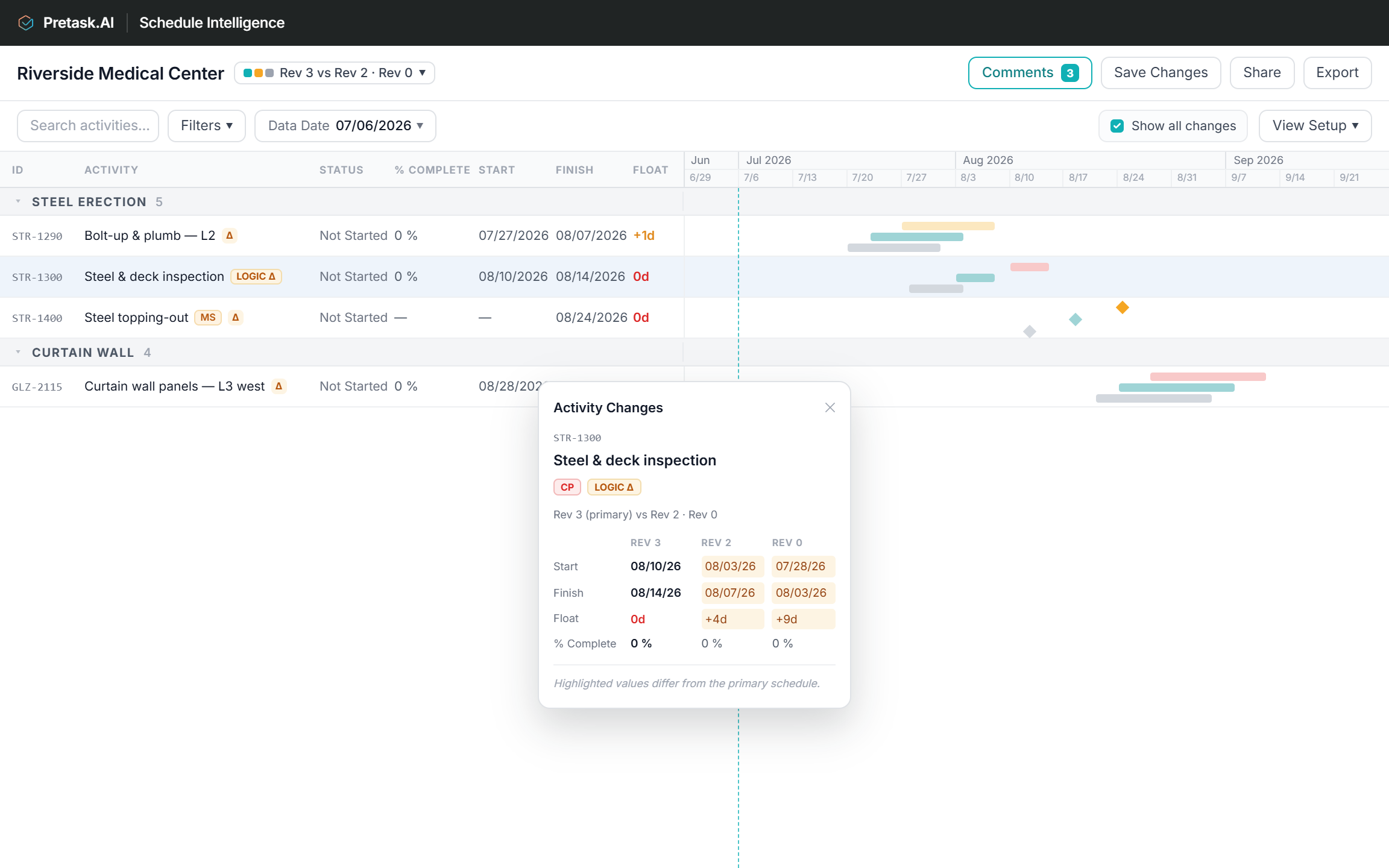
Show all changes to see every difference instantly. Click a flagged activity to see its dates, progress, and logic against the primary revision.
New scope in, deleted scope out. Both surface in the comparison.
Collaborate in one shared workspace
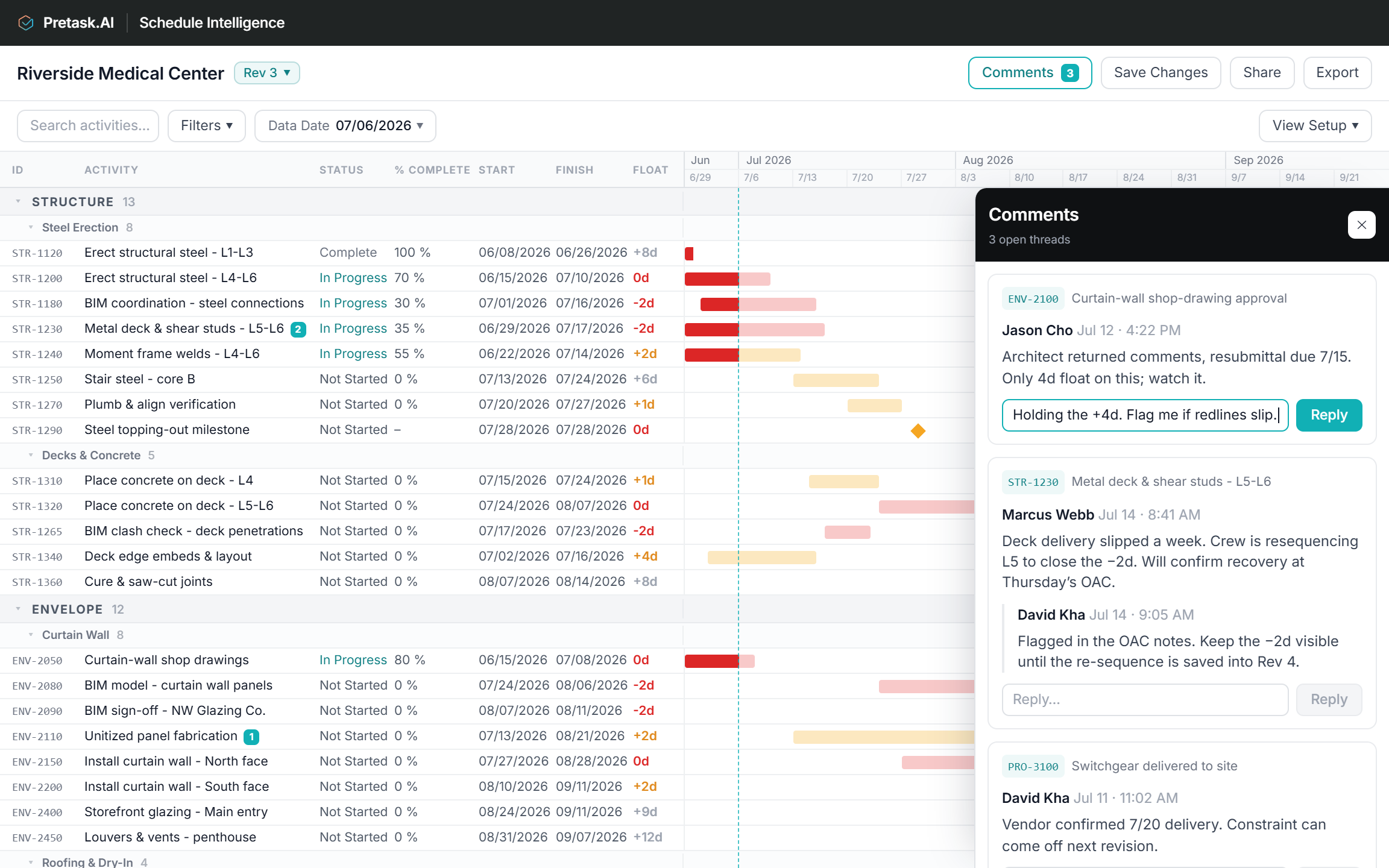
Review and discuss the P6 schedule, without needing Oracle Primavera P6 licenses.
Invite project partners to the exact schedule revision under review so each person starts from the same information.
Keep every thread attached to the activity or WBS row it concerns rather than losing the discussion across email, PDFs, and meeting notes.
One click to know if the project finishes on time
Get instant validation scoring, risk identification, and critical path analysis with underlying reasons. Jump directly to the affected activities for additional context.
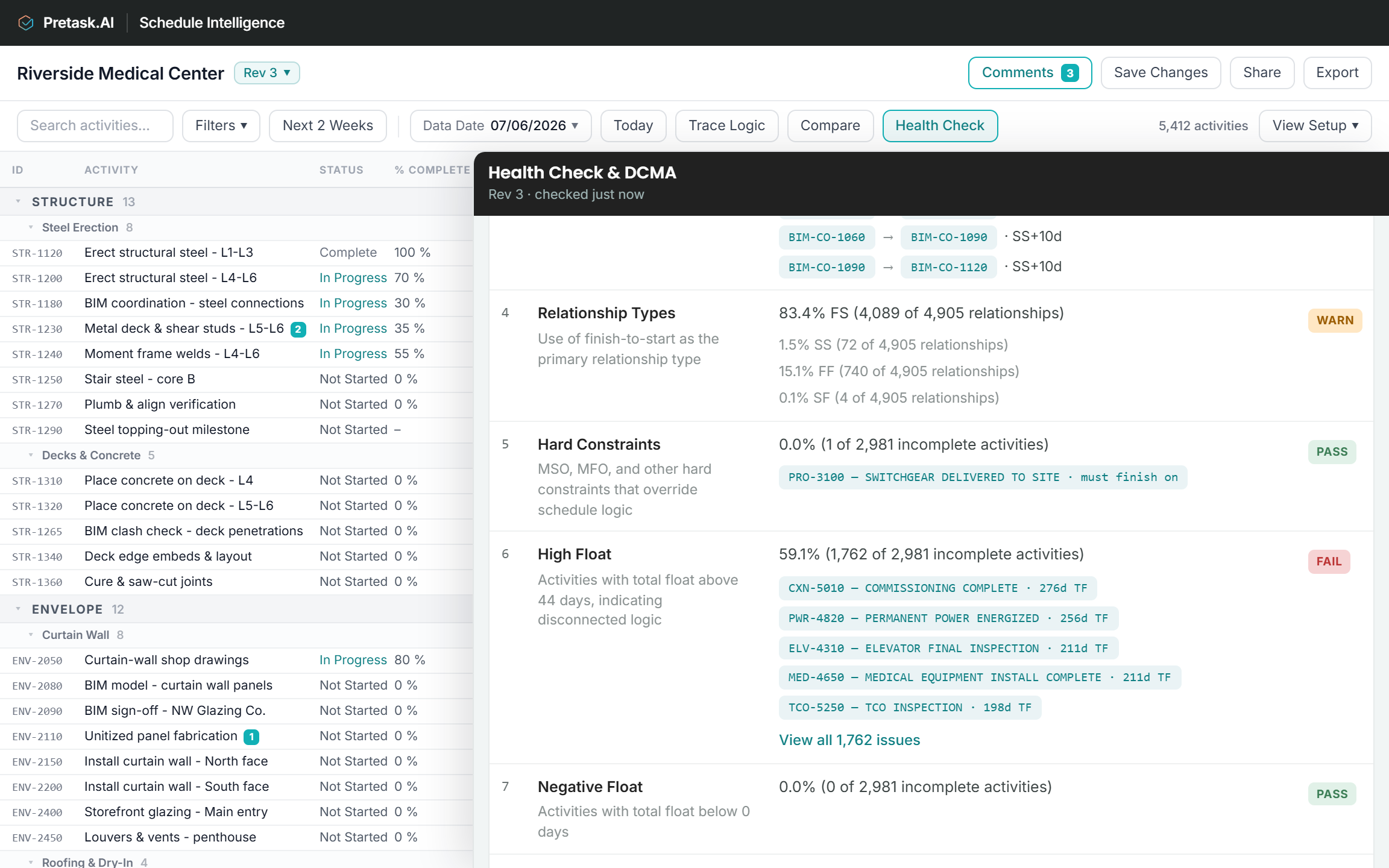
Is this schedule mechanically credible?
How serious are the problems and what is dragging the score down?
Which specific activities warrant review first?
Know what to chase before the finish date slips. Schedule Intelligence ranks the activities deciding it and shows why each made the list. Jump straight to them in the Gantt, or take the list to your next meeting.
Turn project inputs into usable schedule updates
Record status, percent complete, actual dates, and activity level context in a working revision. Save it, share it, and export an updated XER or meeting-ready PDF.
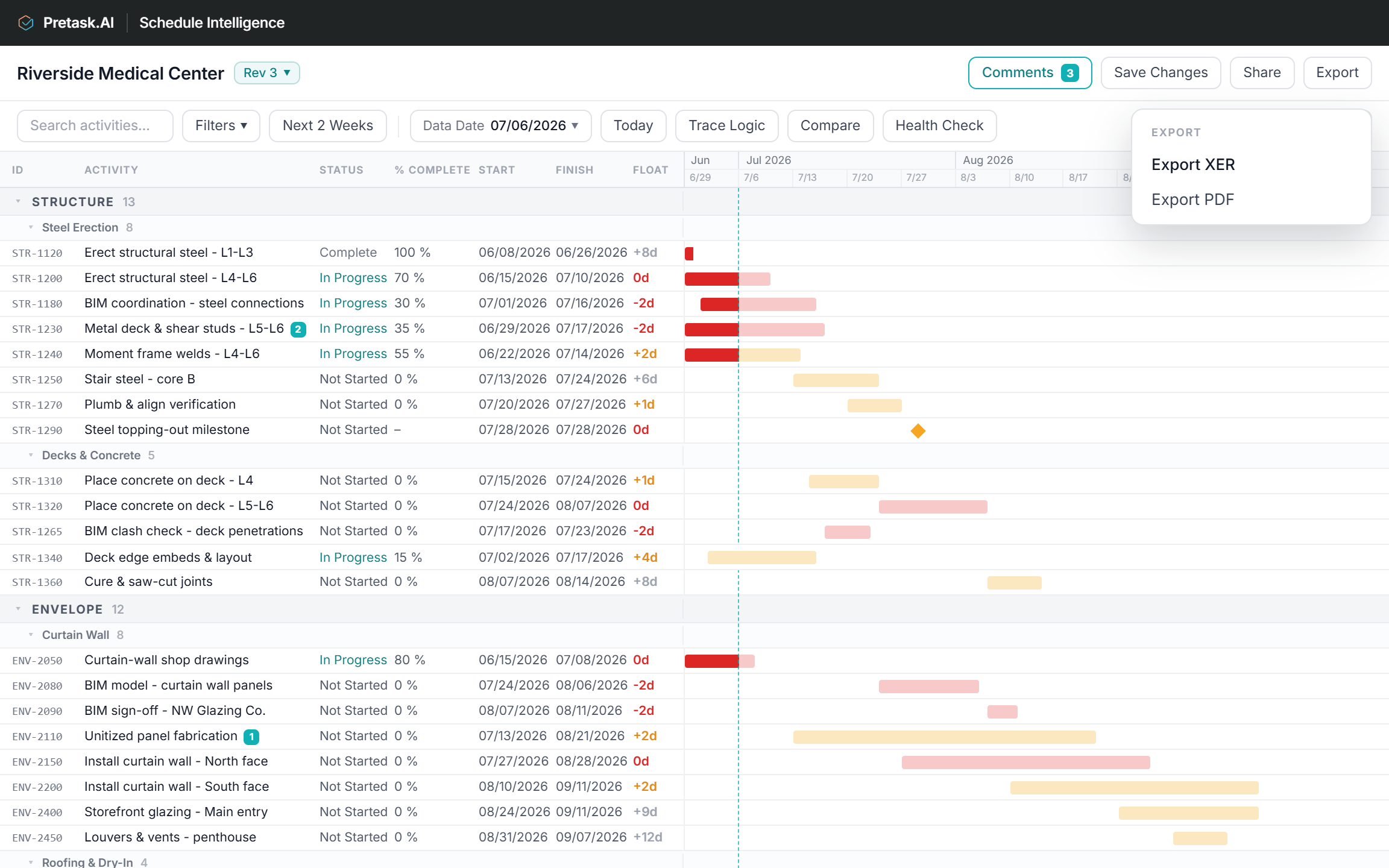
Update status, percent complete, and actual dates against the relevant activities.
Save updates to the existing file, or save as a new revision so the original stays untouched.
Return an updated XER to P6 or create a clear PDF for the next meeting.
Top tier operators from construction, tech, and AI. $20B+ in impact to the construction environment.
A decade in SaaS, most recently at Revizto helping some of the largest AEC firms in the US improve project delivery.
Ex-Director of Machine Learning at Walmart building their prediction technology. 20+ patents, now leading Pretask.AI's technical direction on predictive intelligence for AEC.
Ex-Swinerton National VP (retired). Chris is now supplementing our domain expertise with his extensive construction executive experience.
Building predictive intelligence for the AEC industry
Let's help you work and collaborate better. Priced accessibly for everyone.
Still thinking about it? Try it for free.
Try it on a live project.
Free 30-day trial · up to 5 users · unlimited schedule revisions
Sign up for free trialNot for the scheduler responsible for building and maintaining the master schedule. P6 remains the system of record for schedule logic, calendars, sequencing, and formal schedule updates.
For the rest of the project team, Schedule Intelligence can replace the need to work directly in P6. Schedule Intelligence lets you review the schedule, trace logic, comment on activities, run health checks, and update status, percent complete, and actual start/finish dates without needing your own P6 license. Schedule Intelligence can then export an updated XER for the scheduler to review and continue maintaining in P6.